Quick Answer: Annapurna Yojana is a West Bengal government scheme that gives eligible women aged 25–60 a monthly benefit of ₹3,000, paid directly to their Aadhaar-linked bank account via DBT. Apply online at socialregistry.wb.gov.in; check your application status at socialsecurity.wb.gov.in under “Track Applicant Status.” The scheme replaced Lakshmir Bhandar and launched on 1 June 2026.
If you’ve been searching for Annapurna Yojana, chances are you’re trying to figure out one of three things — whether you’re eligible, how to apply online, or why your application status still shows “under enquiry.” This guide walks through all of it in one place, using the latest information available as of September 2026.
Annapurna Yojana (also written as Annapurna Bhandar Yojana) is a monthly financial assistance scheme run by the Government of West Bengal for eligible women in the state. It replaced the earlier Lakshmir Bhandar programme and currently provides ₹3,000 per month, credited directly to a beneficiary’s Aadhaar-linked bank account.
Below, you’ll find a complete breakdown — from eligibility and documents to the exact steps for applying, checking your status, and what to do if your application was rejected.
What Is Annapurna Yojana?
Annapurna Yojana is a women-focused welfare scheme launched by the Government of West Bengal’s Department of Women & Child Development and Social Welfare. It became active from 1 June 2026, following a state cabinet approval on 11 May 2026 and an official notification issued on 19 May 2026.
The scheme offers a flat monthly benefit of ₹3,000 to eligible women, paid through Direct Benefit Transfer (DBT). It was introduced as a successor to the Lakshmir Bhandar scheme, with most existing Lakshmir Bhandar beneficiaries automatically considered for migration into Annapurna Yojana, subject to fresh eligibility verification.
The money is meant to support everyday household needs — groceries, medicines, electricity bills, children’s education costs, and similar essential expenses.
Annapurna Yojana Highlights
| Scheme Name | Annapurna Yojana (Annapurna Bhandar Yojana) |
| Launched By | Government of West Bengal |
| Implementing Department | Dept. of Women & Child Development and Social Welfare |
| Launch Date | 1 June 2026 |
| Monthly Benefit | ₹3,000 per eligible woman |
| Payment Mode | Direct Benefit Transfer (DBT) to Aadhaar-linked bank account |
| Age Eligibility | 25 to 60 years |
| Predecessor Scheme | Lakshmir Bhandar Yojana |
| Application Portal | socialregistry.wb.gov.in |
| Status Check Portal | socialsecurity.wb.gov.in |
Annapurna Yojana Eligibility Criteria
Before applying, check whether you meet the basic conditions:
- Applicant must be a woman resident of West Bengal.
- Age must be between 25 and 60 years.
- The applicant should not be a permanent employee of the central or state government, or of any government undertaking, panchayat, municipal corporation, or other local government body.
- The applicant should not be drawing a regular pension from any such statutory body or government-aided institution.
- The applicant must not be an income tax payer.
- The applicant should not be employed, in a teaching or non-teaching role, at a government-aided educational institution.
- Existing Lakshmir Bhandar beneficiaries are generally migrated automatically, except those found dead, shifted, or duplicate/absentee during the 2026 Special Intensive Revision (SIR) of electoral rolls — unless they have a citizenship (CAA) application or SIR tribunal case still pending, in which case benefits continue until the case is resolved.
Documents Required for Annapurna Yojana
Keep the following ready before you start the online application:
- Aadhaar Card (mandatory for identity verification)
- Voter ID / EPIC Card
- Bank Passbook (account must be Aadhaar-linked)
- Ration Card
- Residence proof with correct PIN code
- Details of CAA application status or pending SIR tribunal case, if applicable
- Information about school-going children and their vaccination status (if applicable)
- Details of any government scheme benefits already being received by any family member
- Signed declaration and consent form
How to Apply for Annapurna Yojana Online (Step by Step)
The application process runs through the Social Registry portal, not the Social Security portal (which is used mainly for status tracking). Here’s how to complete it:
- Visit the official portal — go to socialregistry.wb.gov.in.
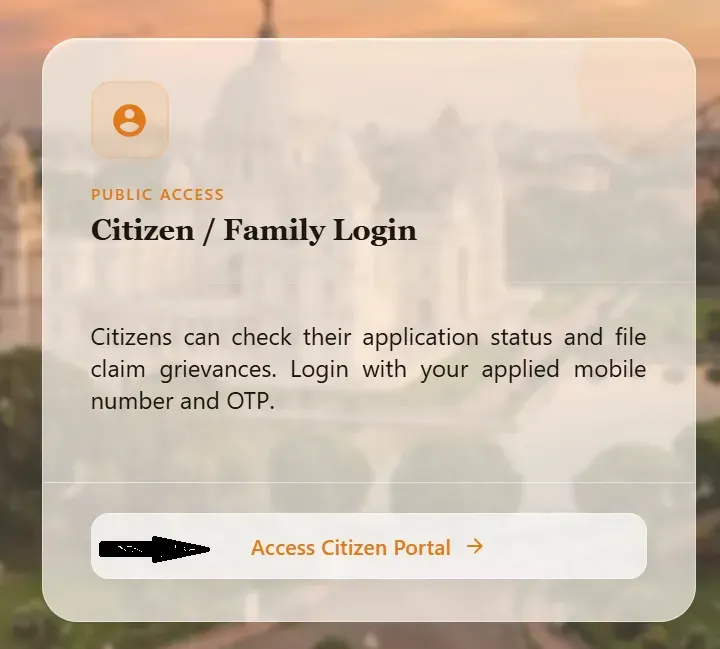
- Open the Citizen Portal by clicking “Access Citizen Portal” on the homepage.
- Select your district from the dropdown list.
- Enter your registered mobile number and click “Request OTP.”
- Verify with OTP sent to your phone to log in.
- Fill out the application form, which is divided into sections covering personal information, address details, identity documents, family/dependent details, and existing government scheme benefits.
- Upload the required documents — Aadhaar, Voter ID, bank passbook, and residence proof.
- Review and submit the declaration, then note your acknowledgment number for future tracking.
Double-check that your name and date of birth match your Aadhaar card exactly, since mismatches are one of the most common reasons applications get delayed.
Read Also: PM Kisan Samman Nidhi Yojana 2026: Eligibility, Installment Dates
Annapurna Yojana Portal Registration — Things to Know
A common point of confusion is that West Bengal actually runs two separate portals:
| Portal | Purpose |
| socialregistry.wb.gov.in | Online application / family-level data collection |
| socialsecurity.wb.gov.in | Application status tracking, payment status, office login |
If you’re applying for the first time, use the Social Registry portal. If you already applied and want to track progress, use the Social Security portal’s “Track Applicant Status” option — not the “Login (for Office user only)” section, which is meant for departmental staff.
Annapurna Yojana Verification Process
Once submitted, applications go through a district-level enquiry and verification process before approval. During verification, officials check:
- Whether the applicant meets the age and residency criteria
- Aadhaar and bank account linkage accuracy
- Income tax payer status
- Government employment status of the applicant or family members
- Voter roll status, especially in light of the 2026 SIR exercise
An “Under Enquiry” status simply means your file hasn’t reached a final decision yet — it doesn’t indicate rejection.
Annapurna Yojana Status Check Online
To check your application status:
- Go to socialsecurity.wb.gov.in.
- Click on “Track Applicant Status” on the homepage.
- Enter the details asked (application/acknowledgment number, or the mobile number and OTP, depending on the current portal version).
- View your current status — Approved, Under Enquiry, or Rejected.
Keep in mind that an “Approved” status and the actual ₹3,000 bank credit are two separate stages — approval doesn’t always mean the payment has already landed in your account. If your status shows approved but you haven’t received payment, carry your acknowledgment slip and bank details to your local BDO/SDO/KMC office for follow-up.
Annapurna Yojana Beneficiary List
There isn’t a single downloadable public list of all beneficiaries; instead, each applicant can check their individual inclusion status via the Track Applicant Status tool described above. If you were previously a Lakshmir Bhandar beneficiary, your migration status will also reflect there once verification is complete.
Annapurna Yojana Form Download
The official application form — titled “Annapurna Yojana Family Level Data Collection Form” — is published as a downloadable PDF on the Social Security portal (socialsecurity.wb.gov.in). It’s useful for reviewing the exact fields you’ll need to fill in before starting the online process, or for offline submission where applicable through Nabanna or designated centres.
Rejected Application? Common Reasons and How to Reapply
Government data indicates a significant number of applications have been rejected during verification, mostly due to:
- Aadhaar-related issues — most common reason; usually means Aadhaar isn’t properly linked to the bank account
- Income tax payer status of the applicant
- Government employment of the applicant or an immediate family member
If your application was rejected, the portal now shows the specific reason for rejection. Reapplication for corrected cases has been opened in phases — applicants with Aadhaar issues should first ensure their Aadhaar is properly seeded with their bank account before resubmitting.
Important Official Links
| Resource | Link |
| Online Application (Social Registry) | socialregistry.wb.gov.in |
| Status Check (Social Security) | socialsecurity.wb.gov.in |
| Department of W&CD and Social Welfare | wcdsw.wb.gov.in |
| Official Scheme Page, WB Government | wb.gov.in |
| National Scheme Listing (MyScheme) | myscheme.gov.in/schemes/aywb |
Only trust websites ending in .gov.in for applying or submitting personal information. Several look-alike sites with names similar to the scheme are not official government portals.
Frequently Asked Questions
What is Annapurna Yojana?
It’s a West Bengal government welfare scheme that gives eligible women ₹3,000 per month via direct bank transfer, replacing the earlier Lakshmir Bhandar scheme.
How do I apply for Annapurna Yojana online?
Register at socialregistry.wb.gov.in using your district and mobile number, verify with OTP, then complete and submit the application form with your documents.
How can I check my Annapurna Yojana application status?
Visit socialsecurity.wb.gov.in and use the “Track Applicant Status” option with your application details.
Who is eligible for Annapurna Yojana?
Women residents of West Bengal aged 25–60 who are not government employees, pensioners, or income tax payers.
Why was my Annapurna Yojana application rejected?
The most common reasons are Aadhaar-bank linkage issues, income tax payer status, or government employment in the family. The portal shows your specific rejection reason.
What does “Under Enquiry” mean in Annapurna Yojana?
It means your application is still being verified by district officials and hasn’t received a final decision yet.
Where can I download the Annapurna Yojana form?
The official PDF form is available on the Social Security portal (socialsecurity.wb.gov.in).
Final Thoughts
Annapurna Yojana has quickly become one of the most searched welfare schemes in West Bengal, and with two different portals handling applications and status checks, it’s easy to get confused about where to go for what. The short version: apply at socialregistry.wb.gov.in, and check your status at socialsecurity.wb.gov.in. Keep your Aadhaar and bank account properly linked, since that single issue accounts for most of the rejections seen so far.
This article is based on publicly available government notifications and portal information as of September 2026. Scheme rules, portal names, and application windows are subject to change — always verify current details on the official West Bengal government website before applying.